Invoicing for event registration: from sign-up to PDF invoice
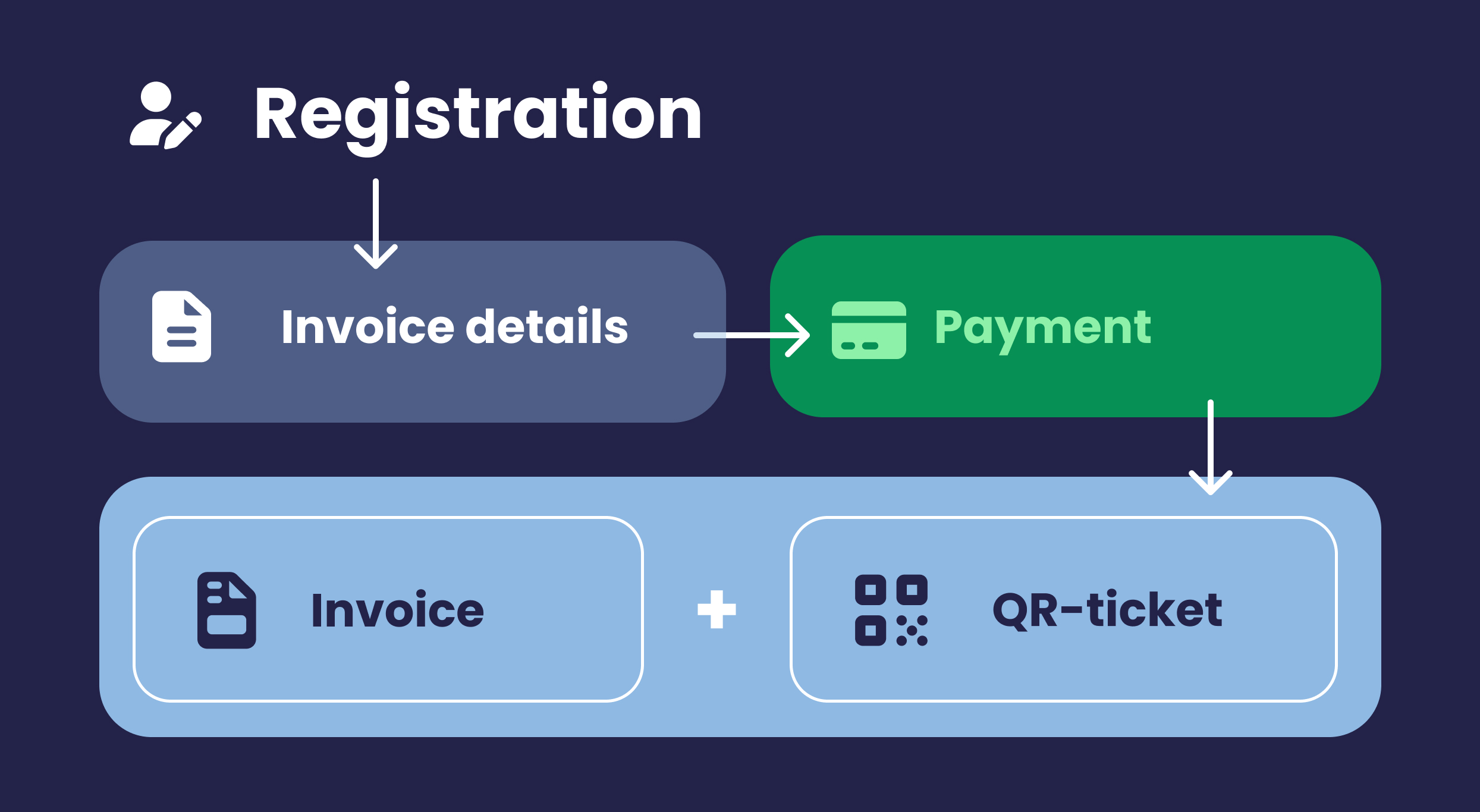
Invoicing for event registration is the process of requesting a participant's invoice details during registration and sending an invoice in PDF format immediately after payment, so registration and administration are handled as part of a single process.
As soon as an event involves participation fees, financial administration becomes part of the process. Participants need an invoice, procurement departments may require a purchase order number, and you don't want to spend three weeks after the event sorting out outstanding payments. By incorporating invoicing into the registration process, most of this is taken care of before the event even starts.
Requesting invoice details during registration
The practical challenge lies in the details. A participant registers using their own name and email address, while the invoice may need to be sent to a department or accounts payable address. That is why you should request these details separately in the registration form.
- Organization name and billing address
- Any purchase order number or cost center
- The email address the invoice should be sent to
- The participant's own name, for the badge and e-ticket
Keep the form short, though. Every additional field can reduce registrations, so only ask for information your administration actually uses. The article about which details to request for event registration explains how to make that decision.
Send an invoice directly with the confirmation
After the payment has been completed, the participant receives a confirmation with the invoice in PDF format and the e-ticket with QR code. This gives them everything in a single email: proof for their administration and the ticket they need for check-in at the venue.
This mainly saves work in the weeks that follow. The question 'can I still get an invoice?' comes in more often than expected for most paid events, and that question largely disappears when the invoice is included immediately.
Overview of who has paid
In the participant overview, you can see for each registration whether the payment has been completed. This overview serves as the basis for reconciliation with your finance department, without having to manually compare registrations and bank transactions. The online payment module processes the payment within the same registration process.
For recurring events, this provides a second benefit. You can see how quickly participants complete their payments for each edition and where people drop out of the process, which you can use when preparing the next edition.
Handle the data carefully
Invoice details are both business information and personal data. Activo's platform is designed with attention to GDPR requirements and aligns with the privacy and security requirements of business clients. For organizations such as ASML, KPN and Triodos Bank, this is a standard part of the assessment process beforehand.
Frequently asked questions about invoicing for event registration
Does a participant automatically receive an invoice?
Can the invoice be sent to a different address than the participant's?
Can we request a purchase order number or cost centre?
Can I see which participants have paid?
What happens if someone registers but does not complete the payment?
Practical advice for your event
Would you like to streamline registration, payment and invoicing for your event? Book a consultation and we’ll take a practical look at your needs together.
Schedule a short consultation