Push notifications that help attendees during your event
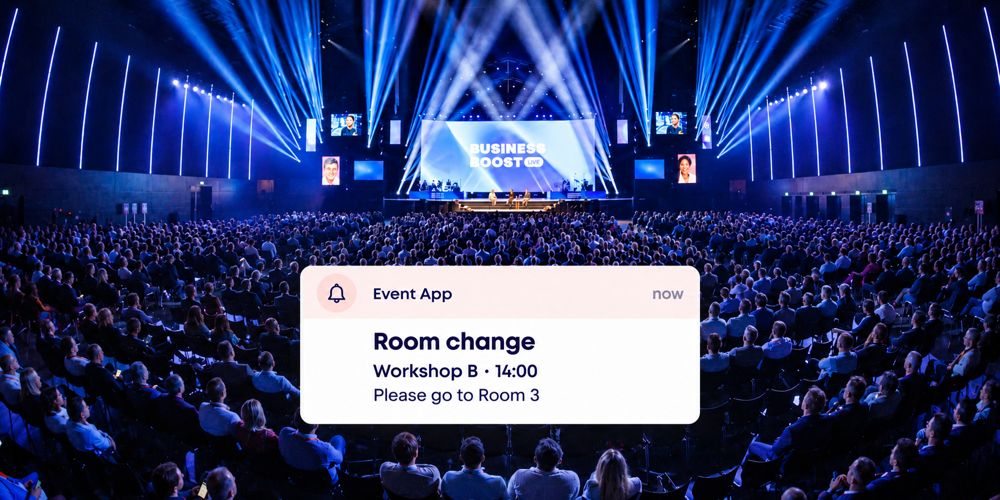
Push notifications give attendees a practical update through the Event App when they need it. This might be a room change, a revised start time or a bus departure. Clear arrangements for content, recipients and sending help you stay in control as an event manager and give your team a shared way of working.
The plenary programme is running ten minutes late and the next workshop is moving to Room 3. For you, these are two changes to the event run sheet. Attendees mainly need to know where to go and when. Activo helps you communicate that information clearly and prepare the process before the event.
Choose messages that help at that moment
A useful push notification helps an attendee take the next step. For each message, decide what someone should be able to do with it. Is the information relevant now, and does it need their attention? A short notification can then be appropriate. Examples include:
- A room change for a workshop or breakout session.
- A revised start time after an earlier session runs over.
- A shuttle bus departure from an agreed pickup point.
- A request for speakers to meet their event contact.
Match the number of messages to the length and format of your event. An afternoon in one room needs a different approach from a conference with parallel sessions. Give general information a clear place in the app; use push notifications to draw attention to what matters at that moment.
Keep it short and make the next step clear
Start with what is changing or about to begin. Then add the time and location. Use the same room names as the programme and venue signage so attendees can act on the information straight away.
These sample messages show how specific you can be:
Room change: Workshop B starts at 14:00 in Room 3.
Revised start time: The plenary session starts at 15:10 in the Main Hall.
Shuttle departure: The bus leaves at 17:30 from the main entrance.
Cover one subject per message. Put any longer explanation in the relevant programme information. An attendee on the way to a session mainly needs a clear direction.
Match the recipients to the message
A change to Workshop B is mainly relevant to the people attending it. Decide in advance which groups you want to inform, such as attendees of a particular session, speakers or everyone at the event.
We align the Event App setup with those groups and the registration data. This includes checking how to select the right recipients and how later changes to session choices are handled. Before the event, your team will know which selection belongs with each message.
The Event App with e-ticket brings together personal programmes, practical information and updates. It gives attendees a familiar place to prepare for their visit and find information during the event.
Plan the messages in your event run sheet
Prepare the wording for predictable moments in advance. For each message, record the recipients, intended sending time and person responsible. Agree when each message will be sent and who gives the go-ahead.
Tie a notification about a session starting to what is actually happening. If lunch runs over, update the planned communication first. This keeps the message in step with attendees' experience at the venue.
Appoint one person to send the messages and nominate a backup. Go through the controls together and send a test message before the event. On the day, everyone will know who confirms a change, who checks the wording and who presses send.
Keep the programme and your team aligned
A room change also calls for an update to the programme information. Make that change using the agreed process and check what attendees see in the app. Then send the notification with the new room and start time.
Inform the colleagues involved at the venue too. A host at the previous room and an updated information screen help direct attendees to the right place. Record these steps together in the event run sheet so the team can work through them promptly when something changes.
Build on what works for your event
For the Alliander Leadership Day, Activo provided an Event App with an interactive venue map and personalised push notifications. The organisers could share important updates during the day. View this case study for an example of communication around a programme with different activities.
After your event, discuss which messages helped attendees and which questions the hosts received. Use those experiences to refine the plan for the next edition. Your team can build a way of working that suits your attendees and programme.
Frequently asked questions about event push notifications
How many push notifications should I send on an event day?
Can I send targeted information to different groups?
How do I prepare push notifications in advance?
What should a room change notification say?
Who sends the notifications during the event?
How do attendees know where to find the event information?
Discuss communication during your event
Would you like to put push notifications to practical use at your next conference, client event or staff gathering? In a short consultation, we look at your programme, attendee groups and team responsibilities. Bring your event run sheet if you have one; we will help you plan a workable approach.
Arrange a short consultation