Help attendees network through the Event App
You want guests at your client event to meet interesting people and leave with fresh ideas. Networking through the Event App helps attendees find each other and start a conversation. A familiar digital setting, combined with time and space to meet at the venue, makes it easier to connect in a way that reflects your brand.
One guest wants to meet someone from the same sector. Another would like to continue a discussion after a presentation. Activo's Event App supports this with an attendee list, one-to-one chat and the option to connect through LinkedIn. We help you choose the elements that suit your guests and the purpose of your event.
Start with the connections you want to encourage
First decide what networking means for your client event. Do you want guests to share experiences, introduce clients to your specialists or bring partners together? That choice helps shape both the app and the programme.
An attendee list becomes more useful when the information supports those connections. Consider including:
- A recognisable name to help guests find each other.
- An organisation or role that gives context to a profile.
- A short introduction that provides a conversation starter.
- A clear way to make contact.
We discuss which profile details you need and how to collect and display them. Include your own colleagues who will be attending. A guest who wants to speak with a product specialist should be able to identify the right person easily.
Make it easy to move from profile to conversation
Guests can browse the attendee list to see who else is taking part. A short chat message lets them start a conversation or agree a time and place to meet. It gives the meeting a specific purpose.
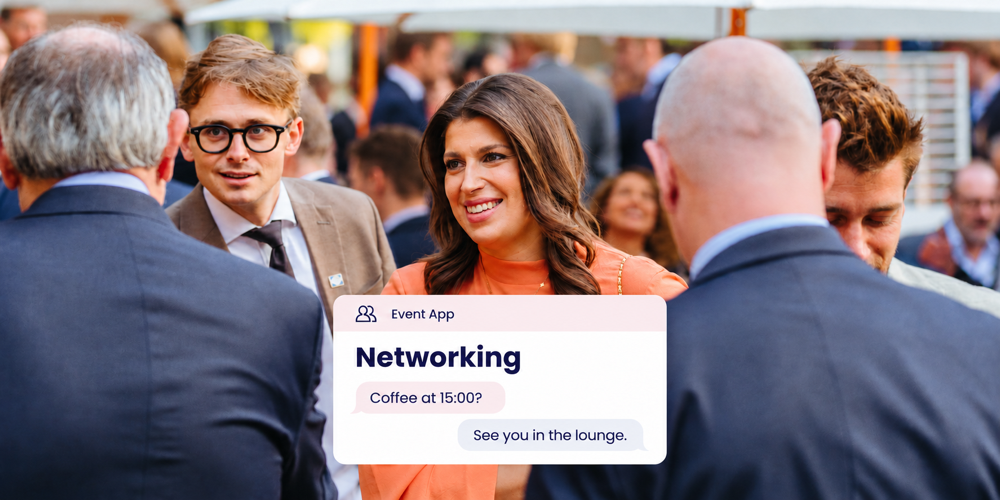
A message can be simple. These examples are enough to make the first connection:
Your question during the presentation caught my interest. Shall we talk about it during the break?
Coffee at 15:00? I'll be in the lounge next to the welcome desk.
Briefly show attendees where to find the list and chat in your pre-event communications. Agree when the app will become available, taking the programme and invitation schedule into account. Guests can then prepare, and the app has a clear purpose from the start.
Make room for conversations in your programme
A good conversation needs time and a clear place to meet. Leave space between programme elements and explain where guests can find each other. A networking table, coffee bar or lounge works well when it is easy to recognise at the venue.
Use the same name for that meeting point in the app and on the signs. 'Lounge next to the welcome desk' is more specific than 'somewhere near the coffee'. Make sure hosts know where the meeting points are so they can guide guests.
Sessions also provide reasons to connect. For example, ask a speaker to invite attendees to exchange experiences in the lounge afterwards. The conversations can then build on the topic that brought your guests to the event.
Reflect your brand and hospitality in the app
The Event App with e-ticket can be designed around your organisation's branding and the event theme. Carry that familiarity through from the invitation, with a consistent visual style, recognisable names and wording that suits your guests.
Make the introduction welcoming and practical. For example: 'Curious who you'll meet at our client event? Explore the attendee list and make contact before the day.' A brief explanation at the welcome desk helps guests who are opening the app for the first time.
The digital experience and the welcome at the venue reinforce each other. Guests recognise the organisation that invited them and know how to approach other attendees. Activo helps you coordinate these elements so your team can focus on the relationships themselves.
Agree which information will be visible
A welcoming networking experience includes clarity about attendee information. Agree in advance which profile details will be shown, who can view the list and how attendees can communicate their preferences. Include these arrangements in the app setup and instructions.
Keep profile information relevant to the purpose of the meeting. Also discuss how someone can request a correction or have a profile removed, and how long the networking area will remain available. Where needed, we involve your privacy or IT colleagues so the approach fits your organisation's arrangements.
Review the value of the connections afterwards
Ask attendees whether they made relevant connections and how easily they found someone to talk to. Discuss with your hosts which meeting points worked well and where guests needed help. This gives you practical ways to improve the next edition.
Agree beforehand which app insights you would like to use and what reporting is available. Combine that information with attendee feedback. Message counts indicate activity; the people involved can tell you more about the value of the conversations.
Use your closing communications to explain how guests can stay in touch and where to find information discussed at the event. This gives the connections made during the day a natural next step.
Frequently asked questions about networking through the Event App
How does the Event App help attendees network?
Can attendees make contact before the event?
How do attendees agree a time and place to meet?
Which details appear in the attendee list?
Can the networking area reflect our branding?
How do I assess whether the networking was valuable?
See how the Event App brings your guests together
Would you like to see how attendees at your next client or partner event can find and approach each other? Request a demo. We will show you the Event App and discuss how attendee profiles, chat and the visual style can suit your guests and brand.
Request an Event App demo