A dealer event with personal invitations from each account manager
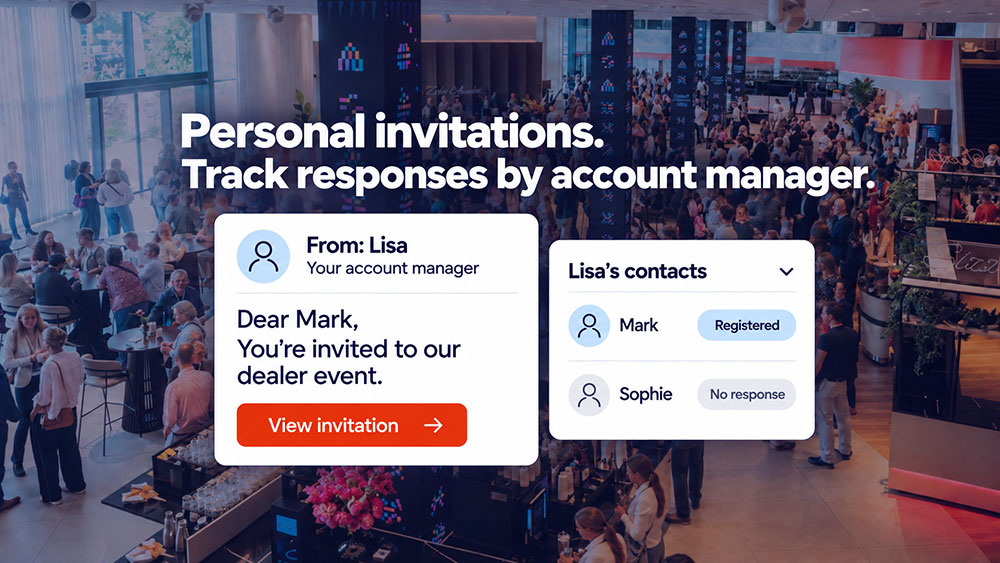
Your account managers want to invite their own dealers personally. Marketing wants a consistent brand identity, an accurate attendee list and a view of overall attendance. That becomes difficult when invitations are sent from different inboxes and registrations come back in separate lists.
A dealer event can bring both needs together: an invitation on behalf of a familiar account manager, linked to one central registration process. The foundation is a clear link between the dealer business, the contact person and the account manager. This keeps communication personal and lets the team know who still needs to be contacted.
Start with one list and clear responsibilities
Before the first mailing, agree who will invite which contacts. Ask account managers to provide their data in the same format: dealer business, name, email address and responsible account manager. Then check the combined list for missing details, outdated contacts and duplicate entries for the same person.
A company name appearing twice is not automatically an error. You might be inviting both the owner and a branch manager. Inviting the same person through two account managers does require a decision: who will be their main contact for this event?
Also establish who will add new contacts and make changes. This prevents an account manager from using an updated list while marketing is still working from an earlier version. The central list remains the shared starting point.
Make the invitation personal and relevant
A recognisable sender is a good start. The content must then explain why the dealer event is worth attending. What can dealers discover, discuss or try out? This might be a product demonstration, a discussion about the coming season or a practical session for the sales team.
Use a personalised greeting and sign off on behalf of the dealer's own account manager. Keep the date, venue, programme and registration button clear and consistent for everyone. This creates one brand experience while allowing for the existing relationship.
Agree on the sender name, sending address and reply-to address in advance. Decide who will pick up and process a reply such as 'Can my colleague come too?' Personal invitations work well when personal replies also reach the right person.
Activo provides event websites with an invitation process in your brand style. The personalisation you want and the links to account managers are agreed in advance.
Make registration easy and account for accompanying colleagues
The invitation leads to one event website. Details you already hold can be pre-filled, leaving invitees to check them. Set up the link to the account manager so dealers do not have to select one themselves.
Can colleagues come along? Decide how many people each dealer business may bring, which details you need for each attendee and how changes should be submitted. A total such as 'There will be three of us' is not enough if you want to produce three personal badges and e-tickets.
Also agree who receives the confirmations and tickets: each attendee individually or the main contact. Test what happens when someone forwards an invitation, adds a colleague or later cancels. The registration must remain linked to the right person and the right dealer business.
Give marketing and sales a useful overview
Marketing needs a view of the whole event. An account manager mainly wants to know which of their own contacts are coming and where personal contact would be useful. Agree how that overview will be made available, who may see which details and how changes will be processed.
Distinguish between invited contacts, represented dealer businesses and registered attendees. For example, twenty dealer businesses with two attendees each produce forty registrations. Count businesses to measure how many dealers you are reaching; count people for catering and badges.
Give each status a clear next step:
| Invitee status | What it means | Appropriate action |
|---|---|---|
| No response yet | No acceptance or decline has been recorded. | A targeted reminder or personal contact from the account manager. |
| Registered | Attendance is confirmed; check any accompanying colleagues too. | A confirmation, followed later by practical information and the e-ticket. |
| Declined | The invitee has said they will not attend. | Stop registration reminders; record any agreed follow-up. |
| Checked in | Arrival has been recorded, if check-in is part of the setup. | Use this as context for follow-up after the event. |
Ask account managers to record telephone responses centrally too. Otherwise, a dealer who has declined may still receive a reminder. No response does not automatically mean someone has not read the invitation.
Coordinate reminders and personal contact
Avoid marketing sending a reminder just after the account manager has called the same dealer. Agree on one communication schedule and check the latest responses before sending.
A registration reminder goes to invitees who have not responded. Registered attendees receive different information: the start time, directions, parking, programme and their e-ticket. Read more about sending reminders to improve attendance.
Continue the personal approach at reception and in follow-up
The relationship should remain visible on the event day too. Make sure the reception team knows which account manager is responsible for each dealer and how to contact them. The badge should display the agreed attendee details; add the account manager's name only if it helps at reception.
If you use QR-code check-in, you can distinguish between registrations and recorded arrivals after the event. Agree on scanning, badge collection and on-site support in advance. Account managers can then follow up on what was actually discussed, such as a product question or an agreed demonstration. A check-in alone does not tell you what a dealer is interested in.
Share only the details needed with the colleagues involved. Agree how attendee data will be used and how long it will be kept, including exported lists.
Frequently asked questions about invitations by account manager
Does every account manager need their own event website
Can an account manager see only their own contacts
How do you avoid duplicate invitations
Can dealers register colleagues
Discuss the invitation approach for your dealer event
Want to send personal invitations while keeping a central overview? Let us know how many account managers and dealer businesses are involved, whether colleagues are welcome and how you currently keep track of responses. We can then explore the right setup for your invitations, registration and follow-up together.
Request a demo from Activo